Every week there is a new AI tool claiming it will replace half your team, and most of them want your credit card before you even see the dashboard. Yet some of the most capable AI software out there right now is completely free to download, open source, and in a few cases on par with the paid platforms charging you every single month.
Below are ten free, open-source AI tools for small business owners that are actually worth your time, covering image and video generation, music, code review, voice agents, cold email, SEO, and AI agents that can operate a computer on their own. For each one, we break down what it does, how it can help your business or daily workflow, the catch you should know about before installing it, and where to download it.
What Does Free Actually Mean, Anyway?
Many assume that free means it costs nothing, which is not entirely true. Every tool on this list is free to download, yet most of them still need something to run on, whether that is a powerful graphics card, a server, or an AI model that charges per use. Getting a free tool is like getting a free car with an empty tank: the car really is free, you just still need to pay for the gas.
In addition, some free licenses don't allow commercial use at all, which is the one thing a business can't afford to skip. We flag the license and the catch for every tool below so there are no surprises.
1. ComfyUI, the Best Free Higgsfield Alternative
Higgsfield has become one of the go-to platforms for AI generated video and images, but you pay for what you generate there. ComfyUI is the free, open-source alternative: a desktop app that runs image and video generation models directly on your own computer, so there is no fee per generation, and when you run a local model nothing leaves your machine.
Instead of a single prompt box, ComfyUI uses a node-based workflow, where every step such as loading a model, writing the prompt, upscaling the image or adding motion is a block you connect to the next one. Yes, it looks intimidating the first time you open it, yet the good news is you rarely have to build a workflow from scratch. So many people post their workflows online on X, Reddit, YouTube and GitHub that you can simply copy one, drag the file or even an image made with it into ComfyUI, and it loads the entire setup with every block already connected. If that workflow needs add-ons you don't have, ComfyUI Manager finds and installs the missing ones for you.
With over 147,000 stars on GitHub, ComfyUI has one of the largest communities in open-source AI, therefore almost any workflow you can think of has already been built and shared by somebody. Once you have one dialed in, you can reuse it forever and share it with your team, which is the real advantage over a credit-based platform, since you can generate the same style of product shot or ad creative hundreds of times without watching a balance drain.
Where ComfyUI really earns its spot is AI marketing. You can take one product photo and place it into dozens of lifestyle scenes, whether that is a kitchen counter, a gym bag or a beach in Boca Raton, without booking a single photoshoot. You can generate ten variations of the same ad creative and A/B test them on Facebook and Instagram to see which one actually converts rather than guessing. You can also load a LoRA, which is a small add-on model trained on your product or brand character, so it looks the same across every image and video. That is the difference between content that looks like your brand and content that looks like generic AI slop.
The bigger opportunity is UGC, short for user-generated content, which is the style of video where a regular person holds up your product and talks about it straight to the camera. Brands pay creators for every single one of those videos, yet with ComfyUI you can generate an infinite amount of UGC-style videos from the same workflow, swapping the person, the setting, the script and the hook each time. Now pair that with Comfy MCP, ComfyUI's official agent tool, and Claude or whatever AI agent you use can run your existing workflows for you automatically. Simply put, you tell your agent to make 20 UGC-style videos and 20 product images for your summer sale using four different hooks, and it runs your workflows, collects the results and hands you the creatives for an entire ad campaign, ready to test on Facebook, Instagram and TikTok. Connect that same agent to your ad account and it can even set up the campaign itself, with you approving it before anything goes live. What used to mean hiring creators and waiting on edits turns into an afternoon of picking the winners, which makes ComfyUI one of the best free AI marketing tools for small businesses that can't justify a full production budget.
One word of caution: an AI-generated person can show off your product, but they cannot pretend to be a real customer. The FTC's rule on reviews and testimonials doesn't ban AI avatars in ads, yet it does ban fake testimonials, including ones from people who don't exist. Keep your UGC-style ads in the showcase and demo lane rather than passing them off as real reviews.
Best for: Ecommerce stores, marketers and anyone producing a lot of UGC-style ads and visual content for social media.
The catch: You need a decent graphics card to run video models locally, and the learning curve is real. If you would rather have the pipeline built for you, that is exactly what our Social Media Management service does.
License: Open source (GPL-3.0)
Download ComfyUI2. Perplexity's pplx-decider

Most AI models are built to write. Perplexity's pplx-decider is built to decide. You hand it a piece of text such as a customer email, a support ticket or a form submission along with a question like "Which team should handle this?", and instead of writing a paragraph back, it returns a straight answer with a probability attached to every option.
That might sound small, but think about how much of your day goes into sorting things. Is this lead hot or cold? Is this email a complaint or a question? Is this customer about to cancel? pplx-decider answers those questions in a format your software can act on immediately, such as routing a billing question to billing and pushing an urgent technical issue straight to the top of the queue.
On paper, it beats TypeSafe's Jev decision model. On Perplexity's own 11-benchmark panel, pplx-decider scored 85.71% overall versus 84.51% for Jev. Keep in mind, that is a 1.2 point lead measured by Perplexity themselves, and Jev still won 6 of those 11 tests, so "on paper" is doing a lot of work in that sentence.
Not to mention, it is far cheaper and quicker than throwing a frontier model like GPT or Claude at the same job. When you ask a frontier model to sort a ticket, it reads the ticket and then writes its answer out word by word, and you pay for every one of those output tokens, which are usually the most expensive part of the bill. If it is a reasoning model, it thinks out loud before answering too, and you pay for that as well. pplx-decider skips the writing entirely. It reads the text once and returns the answer, so each question counts as a single output token, and through Perplexity's Decisions API output tokens are free, with the full model at $0.02 per million input tokens and the Flash version at half that. When you are sorting thousands of emails or tickets a day, that difference adds up fast, and since nothing is being written out, the answer comes back quicker too.
Where it really shines is next to an AI chatbot. The chatbot handles the conversation, and the decision model decides when the customer is frustrated enough that it is time to hand off to a real person before that frustration turns into a one-star review.
Best for: Support teams, ticket routing, lead scoring and screening incoming documents.
The catch: The full 27 billion parameter model needs roughly 49 GiB of GPU memory, which is server territory, not a laptop. Perplexity also offers a smaller Flash version and a paid Decisions API if you don't want to host it yourself.
License: Open weights (Apache 2.0)
Download on Hugging Face3. PR-Agent, a Free AI Code Review Tool
If your business has a website, an app or any custom software, somebody is writing code, and somebody should be reviewing it. PR-Agent is a free, open-source AI that reviews every pull request, which is simply a proposed change to your code, before it goes live. It summarizes what changed, points out bugs and security issues, and suggests improvements, all as comments right inside GitHub, GitLab, Bitbucket or Azure DevOps.
Your developers can also talk to it directly with commands like /review, /describe, /improve and /ask, so a junior developer gets a second set of eyes on every change without waiting on a senior developer's schedule.
PR-Agent was originally built by Qodo, who handed the project over to the community, and it now sits at over 16,000 stars on GitHub. For a business, that means fewer bugs reaching your customers and a written record of every change, which matters a lot more than people think the day you switch developers and the next person has to figure out what was built. If you are having a site built, it is worth asking your web development partner how their code gets reviewed.
Best for: Businesses with in-house developers, freelancers or any custom website or app.
The catch: You bring your own AI model API key, such as OpenAI, so the tool is free but the AI it calls is not. In addition, AI review works alongside a human reviewer, it doesn't replace one. It catches the obvious mistakes so your developer can spend their time on the ones that actually need judgement.
License: Open source (MIT)
Get PR-Agent on GitHub4. fframes, for Vibe Coding Videos
Vibe coding is when you describe what you want to an AI coding agent like Claude Code or Codex and let it write the code for you. fframes applies that idea to video. Instead of dragging clips across a timeline, your AI agent writes the video as code and fframes renders it into a finished video file.
Why would anybody want to make a video with code? Because code is repeatable. Once you have a template for a product promo, a weekly stats recap or a customer testimonial card, you can generate 50 versions by swapping the text and images rather than editing 50 videos by hand. fframes claims it renders over 30x faster than Remotion, one of the most popular code-based video tools, and it ships with a skill you install in one command so your AI agent already knows how to use it.
For a business, that is a steady stream of branded short-form content for Instagram, TikTok, YouTube Shorts and LinkedIn without hiring an editor for every single post, which pairs well with the content strategy from our How to Improve SEO for Free post.
Best for: Repeatable branded videos: promos, recaps, announcements and social clips.
The catch: It is built in Rust and needs the Rust toolchain and FFmpeg installed, so it is aimed at developers or business owners comfortable letting an AI agent handle the setup. It is also still in beta, so expect things to change between versions.
License: Open source (MIT)
Get fframes5. YuE2-3B, an Open-Source Suno Alternative for Creating Music
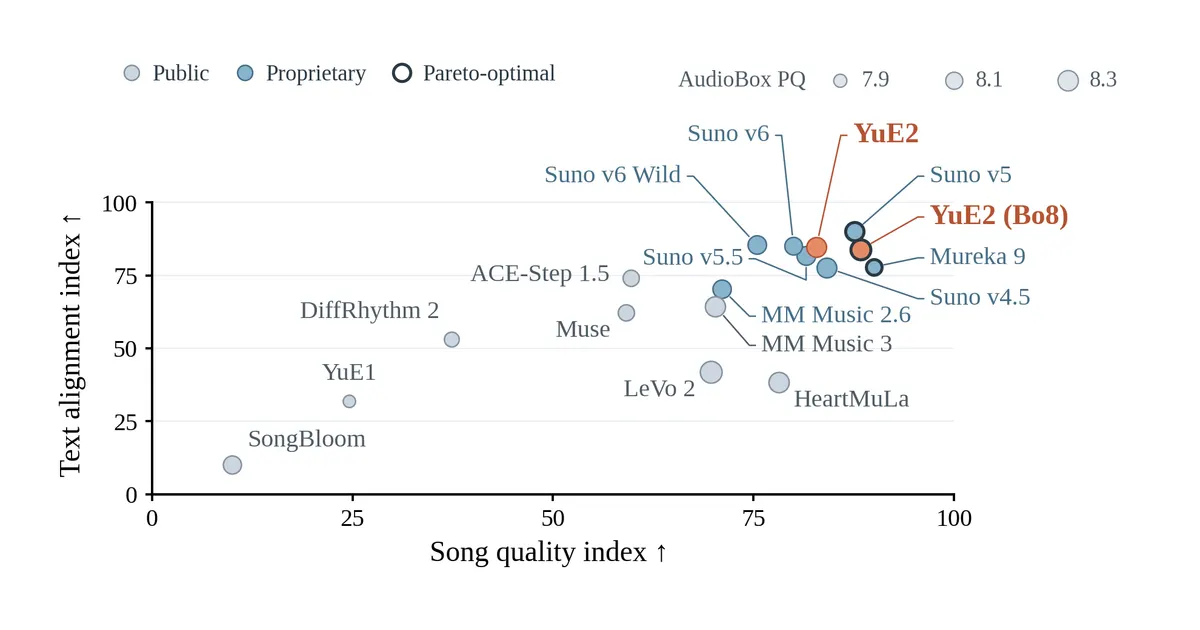
Suno made AI music mainstream, and YuE2-3B is the open-source answer to it. Give it lyrics and a style prompt and it generates a full song with vocals and instruments. What sets it apart is that it first writes an editable score, meaning the melody and chords, before turning it into audio, so you can adjust the song's structure instead of rolling the dice again on every generation.
The numbers are impressive. On WildSongBench, the developers' own benchmark, YuE2's best-of-8 setting scored 6.96 versus 6.87 for Suno v5 and 6.56 for Suno v6, and it generated a 3.6-minute song in 71 seconds on a single RTX 4090, according to its model card.
Yet best-of-8 means generating eight songs and keeping the best one. A single generation actually trails Suno v5 on that same test, not to mention these are the developers' own numbers rather than an independent review.
More importantly for a business, the model weights are licensed under CC BY-NC 4.0, which means non-commercial use only. Simply put, you cannot drop a YuE2 song into a paid ad or sell it. That is the free-but-not-free trap from earlier, and it is the reason you should always read the license before building anything on a free tool.
Best for: Experimenting with a sound or jingle idea before paying for a commercial license, and personal projects.
The catch: Non-commercial license, and you need an NVIDIA graphics card with 24GB of memory plus 24GB of system RAM to run it locally.
License: Open weights (CC BY-NC 4.0, non-commercial)
Download on Hugging Face6. Hermes Agent

Hermes Agent, from Nous Research, is an open-source AI agent that gets better the more you use it. After it finishes a complex task, it can write itself a reusable skill for next time, it remembers past conversations, and it builds a picture of how you work over time. Think of it as an assistant who takes notes after every task rather than one who shows up every Monday having forgotten everything.
There is a reason you barely hear anybody talk about OpenClaw anymore since Hermes Agent was released. Nous Research bills Hermes as the only agent with a built-in learning loop, and for a business that is the part that matters most, since an agent that gets better at your workflows every week is worth a lot more than one that stays as yesterday.
It lives where you already communicate: Telegram, Discord, Slack, WhatsApp, Signal and the command line. It has a built-in scheduler, so you can tell it in plain English to send you a daily report or run a weekly audit and it handles it unattended. It also isn't tied to one AI company, since you can switch between OpenRouter, OpenAI, Anthropic, Nous Portal or your own model without changing anything.
Hermes Agent has passed 260,000 stars on GitHub, which puts it among the most popular open-source AI projects out there. For a business, it covers daily summaries, scheduled reports, research and the repetitive admin that eats your week, which is the same job our AI Personal Assistant service sets up for clients.
Best for: Business owners drowning in admin, research and recurring reports.
The catch: The software is free, but the AI model you connect to it costs money per use unless you run a local one. In addition, an agent with access to your messages, files and accounts needs to be locked down properly before it ever touches customer data.
License: Open source (MIT)
Get Hermes Agent7. LiveKit, an Open-Source AI Voice Agent
Recent data shows that around 62% of incoming calls to small businesses go completely unanswered, and 85% of callers who reach a voicemail hang up and call a competitor. LiveKit Agents is the open-source framework behind a lot of the AI voice agents built to fix exactly that problem.
It lets you build an AI that holds a real-time phone conversation. It listens with speech-to-text, thinks with a large language model and replies with a natural sounding voice, and you can mix and match the provider for each piece. Through LiveKit's telephony integration, the agent can answer inbound calls and place outbound calls on a real phone number. It also uses a turn detection model to figure out when the caller has actually finished talking, which cuts down on the awkward interruptions that give most voice bots away.
For HVAC technicians, plumbers, law firms and medical practices, that means answering after-hours calls, booking appointments and qualifying leads 24/7/365. Since it is a framework, you also decide what happens when the AI isn't enough, such as transferring the call to a real person on your team. Building that well is what our AI Voice Agent service does.
Best for: Any business that loses leads to missed calls.
The catch: It is a developer framework, not a plug and play app. You need to build the agent, connect a phone number, choose speech and AI providers that each charge per use, and keep outbound calls compliant with TCPA and state laws.
License: Open source (Apache 2.0)
Get LiveKit Agents on GitHub8. OpenSEO, a Free Semrush and Ahrefs Alternative
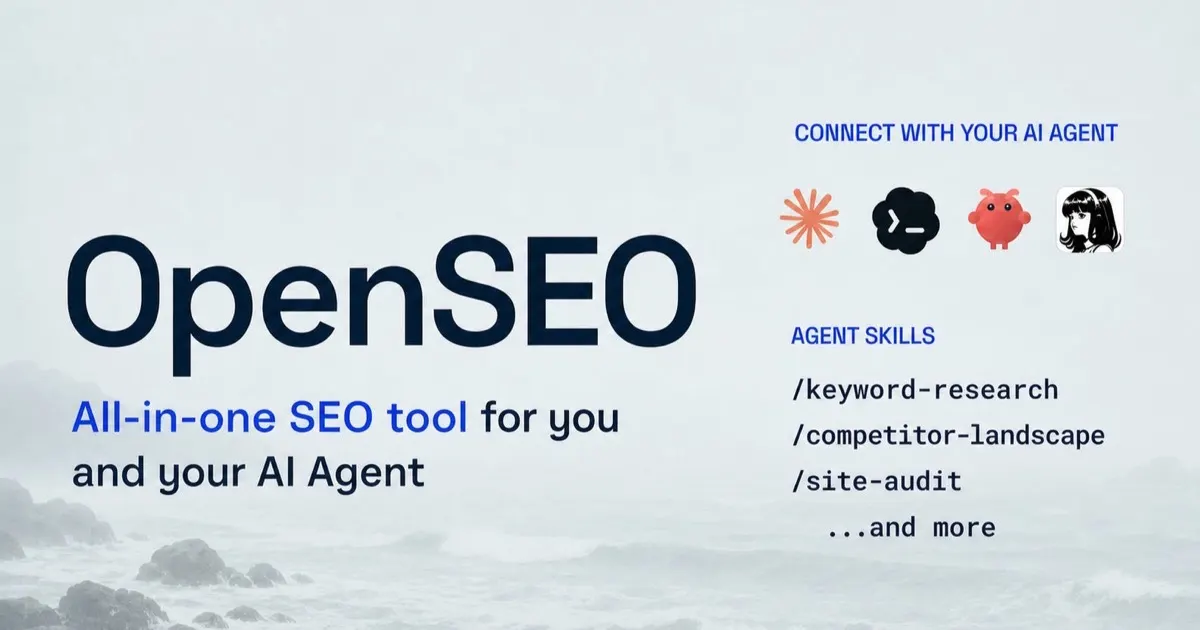
Semrush and Ahrefs are great tools, but their monthly subscriptions are a lot for a local business that checks its rankings a few times a month. OpenSEO is an open-source alternative covering keyword research, rank tracking, competitor insights, backlinks, site audits and AI visibility, which is whether your business shows up in AI answers at all.
Rather than a subscription, you bring your own DataForSEO API key and pay only for the data you actually pull. You can self-host it on your own server or deploy it to your own Cloudflare account, which works on Cloudflare's free plan. It also connects to AI agents through MCP, so you can ask Claude Code, ChatGPT or Codex which keywords you rank for in Boca Raton and it pulls the real data instead of guessing.
With over 27,000 stars on GitHub, it is a solid way to track local keywords across Boca Raton, Delray Beach and West Palm Beach and catch the technical errors from our free SEO guide. Just remember, as we covered in Is SEO Dead?, the tool shows you the data, it doesn't do the SEO for you.
Best for: Local businesses and freelancers who want real SEO data without a monthly subscription.
The catch: The software is free, the SEO data is not, since every DataForSEO request costs a small amount. You also still need a strategy, and that is where our SEO service comes in.
License: Open source (MIT)
Get OpenSEO9. Warmbly, a Free Instantly Alternative
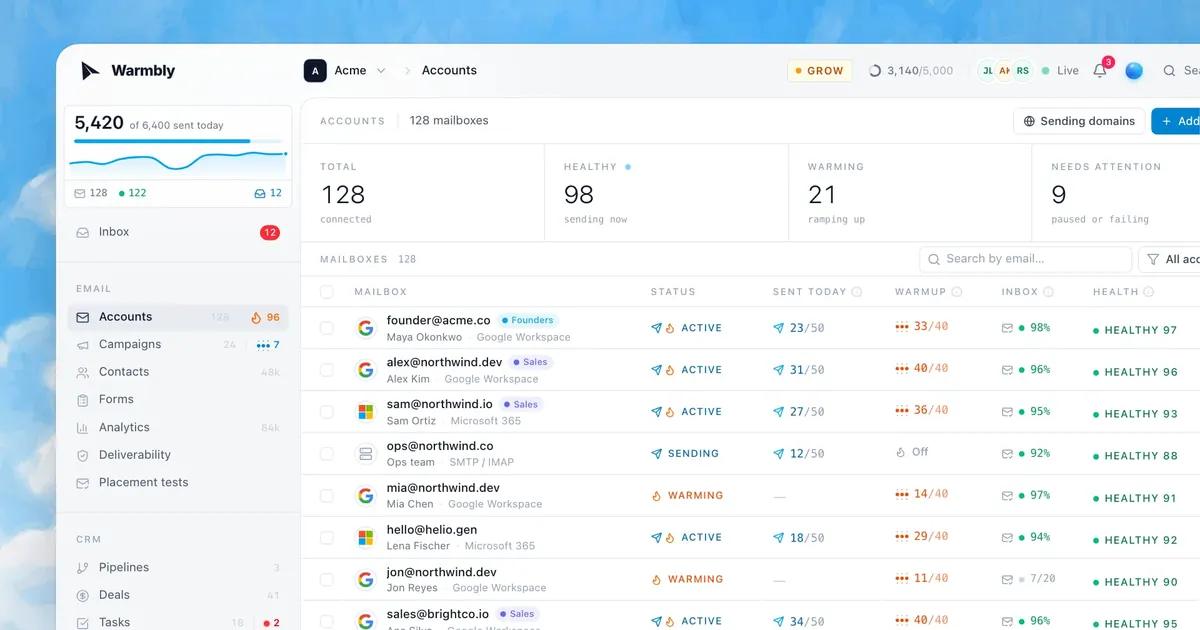
Cold email still works, but only if your emails actually land in the inbox. Warmbly is an open-source alternative to Instantly that handles both sides of that. It runs multi-step cold email campaigns from the mailboxes you already own, and it warms those mailboxes up so they keep landing in the inbox rather than spam.
What is email warmup, anyway? Simply put, a brand new mailbox that suddenly sends 200 emails a day looks exactly like a spammer to Gmail and Outlook. Warmup gradually builds a sending reputation by exchanging emails with a pool of other mailboxes, and Warmbly uses a pool of monitored mailboxes rather than throwaway accounts.
On top of that, you get a unified inbox for every mailbox, a built-in CRM with pipelines, deals, tasks and meetings, bounce and complaint tracking, AI-powered reply automations, and integrations with HubSpot, Slack and Zapier. You can self-host the whole platform with one command, with no AWS, Google Cloud or Stripe account required. If you want the campaigns run for you instead, see our SMS & Email Marketing service.
Best for: B2B companies doing outbound sales who want campaigns, inbox and CRM in one place.
The catch: Self-hosting means you manage the server, the backups and the security of your mailbox credentials. In addition, cold email has rules: CAN-SPAM requires a working unsubscribe option and your physical address in every commercial email, and no amount of warmup will save a domain that ignores them.
License: Open source (Apache 2.0)
Get Warmbly10. CUA, an Open-Source Computer Use Agent

Most automation needs an API, which is the way one piece of software talks to another. Yet plenty of businesses still run on software that doesn't have one, such as a desktop accounting program, an old practice management system or a vendor portal you have to click through by hand. CUA, short for computer use agent, solves that by letting an AI operate a computer the same way you do, by looking at the screen, clicking and typing.
The open-source Cua project includes Cua Driver, which gives your AI agent, whether that is Claude Code, Codex or Cursor, the tools to operate native desktop apps and browsers on macOS, Windows and Linux, often in the background without taking over your mouse. Cua Spaces gives agents their own full desktops as virtual machines, so they work in a sandbox rather than on your actual computer.
Spaces are also multiplayer, meaning you and your agent can work on the same desktop with separate cursors. When the agent needs a decision, you step in, make the call and hand the desktop back. With over 32,000 stars on GitHub, it is one of the most popular ways to automate data entry between systems that don't talk to each other, pull reports out of legacy software and fill out repetitive portals.
Best for: Automating old or closed software that has no API or integration.
The catch: Clicking through a screen is slower than an API and more likely to break when the screen changes, so use it where no integration exists. The Cua Spaces app needs macOS 26 or later and is free for individuals, with paid plans for teams.
License: Open source (MIT); Spaces app is source-available
Get CUA on GitHubFree Doesn't Mean Effortless
Downloading all ten of these tools without a plan is like buying a treadmill that ends up as the most expensive clothes rack in your house. It feels productive for about a week, and then it just sits there. The real value of any of them comes from connecting it to the way your business already runs, whether that is your CRM, your phone system, your calendar or your inbox, and making sure it is secure before it touches customer data.
That is the part Aim High handles for businesses in Boca Raton, Delray Beach, West Palm Beach and the rest of Palm Beach County. If one of these tools caught your eye and you want it set up properly, book a free consultation and we will tell you honestly whether it is the right fit or whether something else makes more sense.
The tools are free. The time it takes to set them up properly is not.
Pick one, start small, and build from there.